Shipping and VAT
In some countries the VAT for shipping is based on the VAT of the items included in the basket. Norce can cater for this by setting up a dedicated structured freight article.
Instructions
In the Norce Commerce admin UI, shipping methods are configured as Delivery Methods under Shopping > Delivery Methods, and this guide uses the term Delivery Method throughout.
-
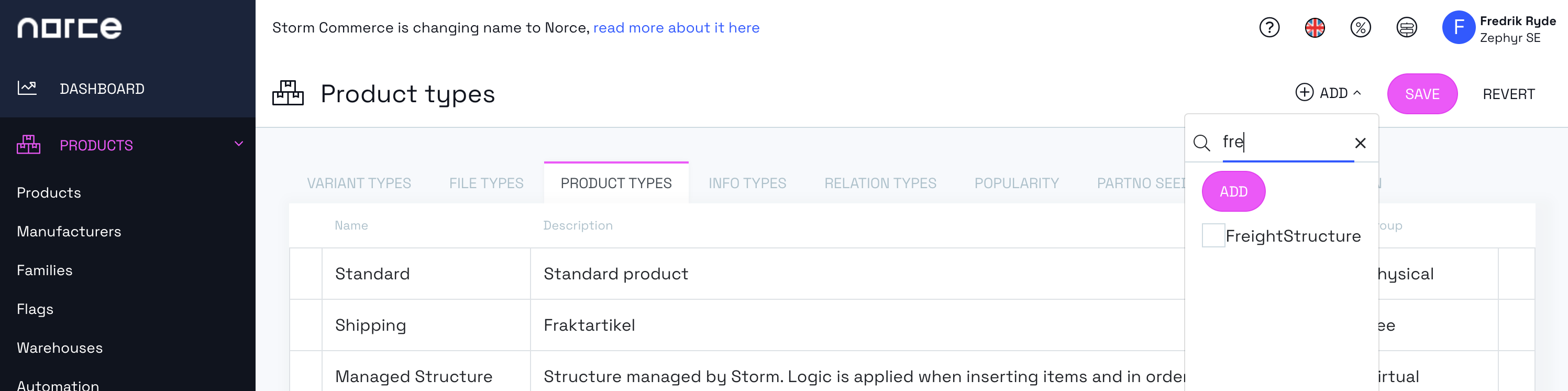
To accomplish this, first make sure that the Product Type FreightStructure is enabled under Products > Settings > Product Types
-
Create a regular product of type Freight for each VAT Rate for which the VAT should be distributed among and set the appropriate VAT rate for these like the example below:
- Freight 25 (VAT 25%)
- Freight 12 (VAT 12%)
-
Now create a new product of type FreightStructure
-
With your new FreightStructure product go to the Structure tab and add your products
-
Connect the FreightStructure product to each Delivery Method that should distribute shipping VAT. In Norce Commerce this connection is a pricing row on the Delivery Method: go to Shopping > Delivery Methods, select the Delivery Method, scroll to the Pricing section on the Detail page, click Add pricing and select the FreightStructure product as Pricing product. The pricing product search lists products of product type Freight and FreightStructure. The full procedure is described in Connecting a Freight Product to a Delivery Method.
How Norce Commerce Distributes the Shipping VAT
When a Delivery Method connected to a FreightStructure product is selected in the checkout process, Norce Commerce splits the shipping fee across the freight products included in the FreightStructure. Each deliverable basket item is grouped by its VAT code, and each group receives the share of the shipping fee that corresponds to that group's share of the total item value. The share is added to the basket as the freight product that has the matching VAT code, so the VAT of the shipping fee is proportionally distributed among the VAT rates of the purchased items.
Troubleshooting Shipping VAT Distribution in Norce Commerce
A FreightStructure product used for shipping VAT distribution must include one freight product for every VAT code that can occur among the purchased items. If a VAT code is missing, Norce Commerce returns an error when the basket is priced:
Error: "Invalid configuration of freight structure {partNo}. This freight structure should include actual freight skus for all supported vat codes. Check this in Admin."
The FreightStructure product connected to the Delivery Method has no products on its Structure tab. Add one product of type Freight per VAT rate to the FreightStructure product.
Error: "Invalid configuration of freight structure {partNo}. This freight structure should include actual freight skus for all supported vat codes. It seems to be missing one for vat code {vatCode}. Check this in Admin."
The basket contains items with a VAT code that has no matching freight product in the FreightStructure. Create a product of type Freight with that VAT rate and add it to the Structure tab of the FreightStructure product.